FloraStack is a Rust workspace: an engine made of library crates, and three thin front ends over it. Everything the apps do goes through the engine’s commands, so the desktop app, the command-line tool, the Python package, MCP clients and scripts all have the same abilities, and the logic is tested once, headless.
AGENTS.md is the rule book every change follows: its crate map, the layering, the never-crash and clean-room rules, and the per-change checklist. This chapter is the tour; read AGENTS.md before your first change.
The crates
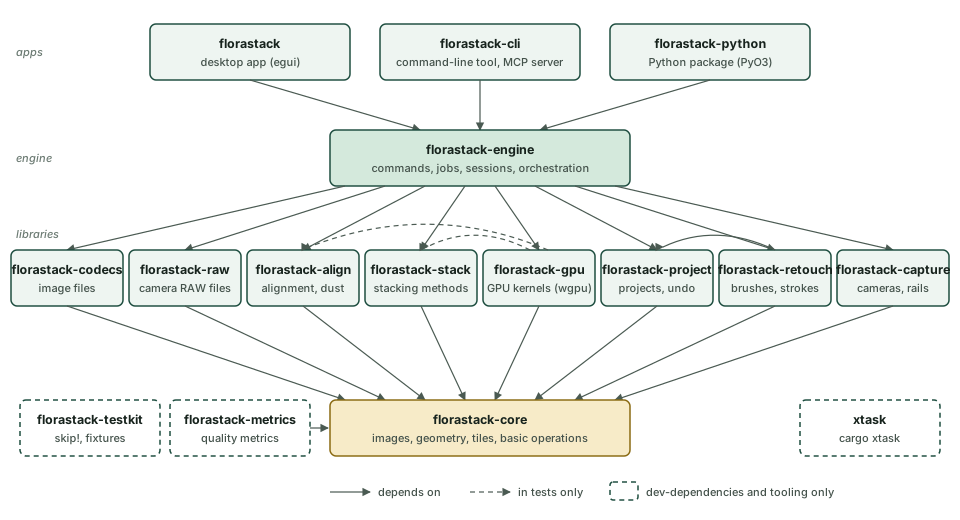
- Core (
florastack-core) holds what everything shares: image buffers and pixel formats, geometry, the tiled view and tile cache that let stacks exceed memory, progress and cancellation (Monitor), the basic operations (blur, resize, Laplacian, warps) and the product’s identity frombranding.toml. It depends on no FloraStack crate. - Libraries, each on the core alone (the retouching crate on the project model too):
florastack-codecsreads and writes image files with their metadata and color profiles, andflorastack-rawdecodes and develops camera RAW files, both over LightCraft’s crates, kept behind FloraStack’s own types.florastack-alignaligns frames to each other, orders and frames the stack, finds dust and movement, and splits batches into stacks.florastack-stackholds the stacking methods, streaming a frame at a time.florastack-gpuruns the hot paths of both on the GPU, each kernel checked against its CPU reference.florastack-projectis the project model and its folder, with every change a value that can be undone.florastack-retouchpaints brush strokes.florastack-capturetalks to cameras and rails.
- The engine (
florastack-engine) ties them together: the command registry, the session that holds the open project and its undo history, the job engine, and the orchestration of a stack from files to export. - The apps (
florastack, the egui desktop app;florastack-cli;florastack-python) depend on the engine alone. They parse input, dispatch commands and show state; pure view state (zoom, pan, the open tab) is all they keep. - Tooling:
florastack-metrics(image-quality measures) andflorastack-testkit(skip!, fixture lookup) are dev-dependencies only, andxtaskruns the checks, the quality report and the packaging.
cargo xtask check-layers enforces these edges (the RULES in xtask/src/layers.rs): a crate may depend only on the
workspace crates its row allows, only the desktop app may use a UI toolkit, and the test-only crates never ship. A test
keeps this diagram’s crates and those rules the same.
A stack, from files to export
- Frames.
project.addFramesrecords each file with its size, time and hash. The engine reads a frame throughflorastack-raw(camera RAW and DNG) orflorastack-codecs(everything else). RAW frames are developed with one set of settings for the whole stack, resolved once on a reference frame, into linear Rec. 2020; other files are linearized from their profile. - Alignment.
align.runreduces the frames to a working size and estimates each one’s shift, scale, rotation and brightness gain against its neighbor (a phase-correlation guess, then ECC refinement coarse to fine), chained to a master frame, with flags for limits, low scores, repeating patterns, frames out of focus and movement. It orders the stack from its narrow end and works out the output’s canvas for each framing. The results are stored in the project. - Stacking. A stacking command plans a job from a snapshot of the project. Its worker reads each frame, and as the
method asks for a rectangle of it, warps that rectangle onto the canvas: a frame is never held whole on the canvas.
The method (a
Stacker, on the CPU or the GPU) folds it into accumulators kept tile by tile within a memory budget, spilling to disk beyond it, so memory depends on the canvas, not the depth of the stack. The result is a new output, cached in the project folder. - Retouching records strokes as values (brush, settings, source, path) in the project and paints them over the output, the same pixels every time.
- Export writes the output through
florastack-codecswith a frame’s metadata, the requested maps and aligned frames, and a JSON sidecar from whichexport.reproducemakes it again.
Projects
A project is a folder, <name>.florastack/:
project.json: the frames, alignment, outputs with their retouch and annotation layers, and preferences; versioned, with migrations from older versions.cache/andpreviews/: developed frames, results and previews, each referred to fromproject.jsonby path, size and SHA-256, and keyed by what it was made from, so that nothing is computed twice and nothing stale is used.- A lock file, so that two processes never edit one project.
Changes are values (Edit) applied by Session::apply, each with its inverse, which is what undo applies. A command’s
edits are one undo step.
Commands and jobs
Every user-facing action is a named command in the engine’s registry with a JSON schema for its parameters and result: The command registry says how to add one, and the engine commands page lists them all. A long command is a job: it plans on the engine’s thread from a snapshot, runs on a worker, reports progress and stops at checkpoints when cancelled, and returns a commit that the engine applies. Jobs run on lanes: heavy (alignment and stacking, one at a time by default), preview (quick previews alongside, on a smaller share of the machine) and device (camera and rail I/O, one operation at a time).
Threads and determinism
Pixel work uses rayon’s parallel iterators over rows, tiles and frames. Results never depend on scheduling: a tile’s fold reads only that tile, and every per-pixel sum runs over the frames in their order, so a stack is the same bit for bit whatever the number of threads, for the same frames in the same order with the same settings. GPU results agree with the CPU’s within documented tolerances.
Where to start reading
crates/engine/src/commands/for what the app can do, one file per area.crates/stack/src/lib.rsandcrates/align/src/lib.rs, whose crate documentation explains the algorithms and the papers they come from.apps/florastack/src/app.rsfor the desktop app’s state and actions, andtests/smoke.rsfor how it is driven in tests.cargo doc --workspace --no-deps --openfor the whole API.